

Original Coverage & Source Attribution: www.cnet.com
Pros & Cons
-
Cutting-edge privacy and security
-
Excellent for streaming
-
Easy to use across platforms
-
Strong commitment to transparency
-
Privacy-friendly jurisdiction (British Virgin Islands)
-
Expensive
-
No multihop connections
-
New price structure doesn’t add much value
ExpressVPN has gone through a great deal of change since my last review – some good, and some not as good. It’s still an excellent choice for basically any use case and it’s still one of the best VPNs you can buy thanks to its innovative privacy and security features, fast speeds and excellent streaming capabilities. But the service has regressed in certain ways, perhaps most notably in its overall usability.
I put ExpressVPN through a rigorous gauntlet of tests, to assess its overall value, speed performance, streaming abilities, feature set, usability, privacy and security. Throughout my testing process, I conducted over 200 individual speed tests across MacOS and Windows platforms, checked how adept each app was at unblocking streaming content from various server locations across the globe, evaluated features across platforms, tested for leaks, pored through the privacy policy and kept in close contact with the ExpressVPN team via video chat and email.
I found that ExpressVPN is still continuously innovating, making it one of the best VPNs for people with critical privacy needs. It’s still also the top VPN for streaming. However, its overall value and usability have taken a dip, despite the VPN’s new app UI and overhauled price structure, which pulls its overall rating down to an 8.
Like a handful of CNET’s other top VPN picks, ExpressVPN is working on pivoting toward becoming more of a comprehensive cybersecurity company, allowing users to bundle additional tools alongside its VPN. Express is dipping into the world of password managers and identity protection services, in addition to offering email protection and a privacy-focused AI tool alongside its VPN. While those additional services deserve a mention here, this review focuses predominantly on ExpressVPN’s core VPN service.
Value (6/10): Still expensive for relatively few features, even with its overhauled price structure
- Key takeaway: I appreciate that ExpressVPN now offers a basic “VPN-only” subscription tier. But the overhauled prices don’t exactly translate to better value.
- $15 a month, $75 for the first year (then $100 a year) or $84 for the first two years (then $100 a year)
- 30-day money-back guarantee
- Payment options: Apple Pay, Google Pay, credit card, PayPal, Bitcoin
- Bundled plans available
| Basic | Advanced | Pro | |
| Annual price | $75 (renews at $100) | $90 (renews at $120) | $135 (renews at $200) |
| VPN | |||
| Simultaneous connections | 10 | 12 | 14 |
| Tracker blocking | |||
| ExpressMailGuard | 10MB | 100MB | Unlimited |
| ExpressKeys | |||
| Identity Defender | |||
| ExpressAI |
ExpressVPN is one of the premier VPNs on the planet, excelling in almost every meaningful VPN metric. However, it’s also historically been one of the most expensive VPNs you can buy. Even though its recently overhauled price structure is more consumer-friendly than the messy structure it previously had in place, ExpressVPN still doesn’t quite strike the right chord for the budget-conscious consumer.
The Basic plan includes the VPN, 10 simultaneous connections, a small selection of Advanced Protection (DNS-based content blocking) features and a limited version of its new MailGuard email protection tool. While I’m glad that ExpressVPN now offers a basic VPN-only plan and no longer forces users to pay for extras they may not want or need, it remains overpriced.
The Basic plan costs $15 a month, $75 for the first year or $84 total for the first two years combined. But be aware that the annual and two-year plans surge to $100 a year at renewal. And the $15 monthly rate is one of the more expensive in the industry.
Granted, ExpressVPN bumped up its simultaneous connection allowance by two (from eight to 10) and added limited MailGuard functionality to its Basic tier, but not too long ago, you could get the VPN, the full suite of Advanced Protection features, plus full access to the Keys password manager for essentially the same price. So, an overhauled price structure that should have added value has arguably diminished it.

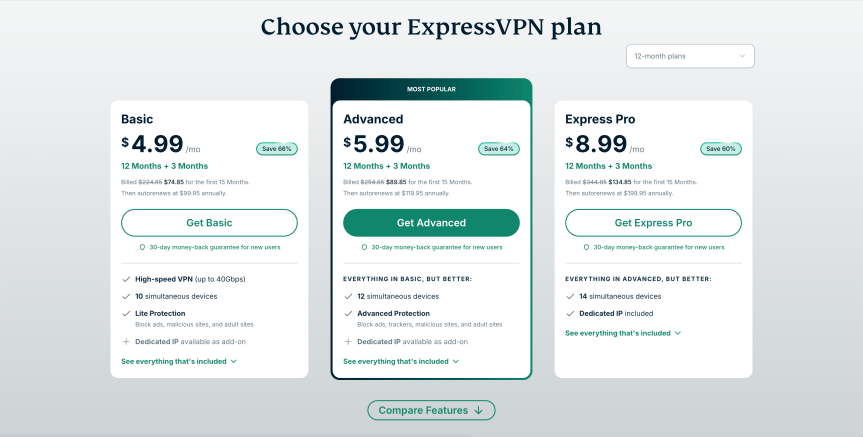
I appreciate that running a VPN company is expensive, especially for one like ExpressVPN that’s continuously pushing the boundaries with new privacy innovations. However, I’d expect my VPN to have a more functional app and more features if I’m paying $100 a year for it.
While ExpressVPN’s annual renewal prices aren’t quite as high as NordVPN’s astronomical $139 per year rate, they’re notably more expensive than Surfshark’s $79 annual renewal price and other budget-friendly options like Mullvad (60 euros, or about $70), Proton VPN ($84) or Windscribe ($69). If you don’t mind paying a premium, ExpressVPN is an excellent choice and one of the most well-rounded VPNs you can buy, but its expensive prices don’t offer the same broad suite of features as the similarly priced NordVPN or Surfshark.
Bundled options available
Like a handful of other VPN companies, ExpressVPN is expanding beyond its core VPN service and offering a fuller suite of online privacy and security tools. With ExpressVPN’s Advanced and Pro subscription tiers, you can add various bundled options alongside the VPN.
The Advanced plan includes the VPN with 12 simultaneous connections, full suite of Advanced Protection features, ExpressKeys password manager, slightly enhanced MailGuard functionality and partial Identity Defender functionality. This midtier plan costs $17 a month, $90 for the first year or $126 for the first two years combined, with the annual and two-year plans both renewing at $120 per year.
If you want access to everything ExpressVPN offers, you can go with the Pro plan, which includes the VPN with 14 simultaneous connections, a full suite of Advanced Protection features, ExpressKeys, full MailGuard and Identity Defender functionality and access to ExpressAI, the company’s new privacy-focused AI agent. The Pro subscription tier costs $23 a month, $135 for the first year or $210 for the first two years combined, with the annual and two-year plans both renewing at $200 a year.
Speed (10/10): The fastest VPN we tested in 2026
- Key takeaway: Supersonic speeds on MacOS over Wi-Fi help propel ExpressVPN back into the top spot as the fastest VPN in 2026.
- 20.82% speed loss in 2026 tests
- Number of servers: 3,000-plus
- Number of server locations: 113 countries (including in all 50 US states)
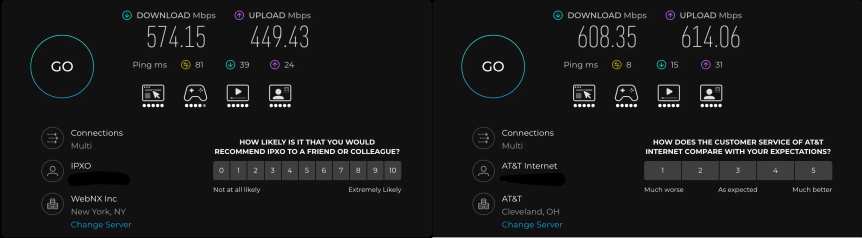
As a team, we tested ExpressVPN’s speeds using its proprietary Lightway UDP protocol on Windows and on MacOS, connecting to various server locations across the globe and comparing speeds through the VPN to our own base download speeds. We measured an overall average speed loss of 20.82% with ExpressVPN in our 2026 speed tests, making it the fastest VPN we tested this year. ExpressVPN edged out Windscribe’s 23.8% speed loss and NordVPN’s 26.5%.
On Windows, we measured an average speed loss of 25.22% over Ethernet and 24.5% over Wi-Fi. That’s pretty good, but I still expected better speed performance on Windows through ExpressVPN’s Lightway Turbo feature, which can route your traffic through multiple tunnels simultaneously, delivering faster throughput and theoretically boosting your VPN speeds on Windows.
I didn’t run a full set of speed tests with Lightway Turbo disabled, but anecdotally, non-Turbo speeds were highly erratic and cut my base speeds by more than 78%, so I recommend enabling Lightway Turbo on Windows whenever you need anything approaching your normal speeds.
Windows speeds were good, but MacOS speed performance was notably better – especially over Wi-Fi, where we calculated an 8.92% average speed loss. Over Ethernet on MacOS, we measured a respectable 24.62% speed loss. Speeds with ExpressVPN on MacOS using Lightway have generally been exceptional throughout my years of testing, and the sub-9% speed loss over Wi-Fi is emblematic of that trend.

Global speed performance was in line with expectations
The relatively slower Windows speeds notwithstanding, ExpressVPN’s speed performance across server locations was mostly in line with my expectations. The one anomaly I noticed was that the speeds I registered on MacOS to ExpressVPN’s New York servers were slightly slower on average to the speeds I got through the UK servers, even though those servers are over 3,000 miles farther away from my physical testing location in Ohio. Otherwise, speeds lined up pretty much exactly in order across all other locations and connection types, with the fastest speeds to New York, slightly slower to European countries and slowest to Australia and Singapore.
Either way, as long as you’re using a fast protocol with the right settings, ExpressVPN delivers plenty of speed for basically anything you want to do online, even data-heavy activities like streaming or gaming.
Features (8/10): ExpressVPN’s features are standard fare, but functional
- Key takeaway: ExpressVPN doesn’t offer a ton of features, but it gives you flawlessly executed essentials.
- Advanced kill switch functionality
- Split tunneling on Windows, Android, Linux and MacOS
- Protocols available: Lightway, WireGuard, OpenVPN, IKEv2
ExpressVPN offers a decent set of tools to help round out your cybersecurity toolkit, with a password manager, privacy-focused AI, email protection and identity protection features alongside the core VPN service. However, the VPN itself sticks largely to the basics – which isn’t necessarily a bad thing, and helps make ExpressVPN one of the best VPNs for beginners.
The relative lack of switches and toggles that ExpressVPN offers in its apps might turn away power users who want more granular control over their connection, but is easier for newcomers (or even veteran users) looking for a streamlined experience. There’s little learning curve with ExpressVPN, and I like that the apps deliver a mostly uniform experience and features across platforms. Some VPNs have noticeable differences from one platform to the next and may have certain features on one platform that they don’t offer on another.
I like that ExpressVPN offers DNS-based content blocking through its Advanced Protection suite of features, but I don’t like that the Basic plan only includes ad, adult site and malicious site blocking. I suppose something is better than nothing, but I don’t think it’s right that users should have to upgrade from the already expensive Basic plan to a higher tier just to get access to the remaining Advanced Protection feature (tracker blocking).
Fuller threat protection features often come standard with many other VPNs, including top choices like Mullvad, Windscribe and Proton VPN, for much cheaper. Windscribe’s Robert DNS filter is one of the most comprehensive content blockers available and blows ExpressVPN’s Advanced Protection completely out of the water. Robert can block malware, ads, trackers, social networks, adult sites, gambling sites, fake news, clickbait, other VPNs and crypto sites, while also giving you the option to add custom rules that allow you to block or whitelist specific domains or IPs.
Features work as advertised
Other than that, ExpressVPN’s feature set gives you everything you need from a VPN. If you have critical privacy needs, you’ll appreciate the ability to set the kill switch to block all internet access unless the VPN is turned on. Most of the time, a VPN kill switch kicks in and blocks your internet connection when the VPN unexpectedly disconnects, which should work just fine for the majority of users. But if you really need to lock down and make sure you don’t mistakenly connect to the internet without the protection of the VPN, ExpressVPN allows you to do so. Both the standard and “always on” kill switch functionality worked as intended during my tests.

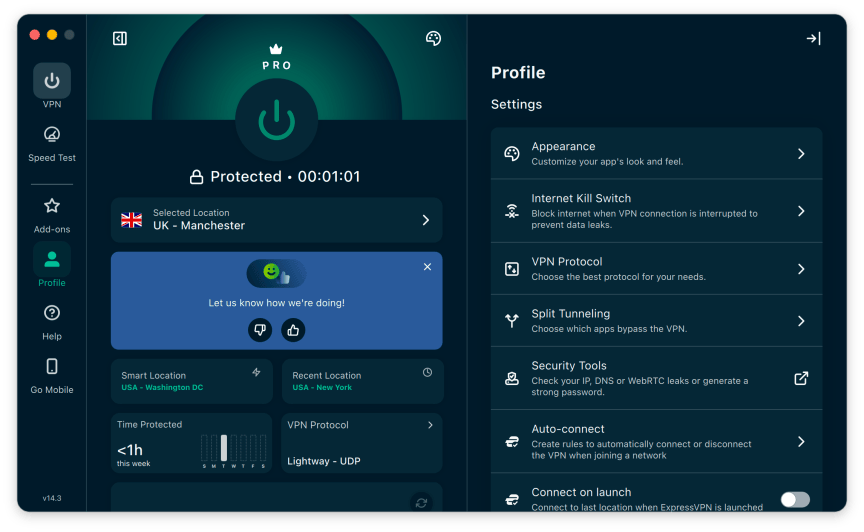
I also like that ExpressVPN offers split tunneling on its MacOS app, which is less of a rarity for VPNs now than it once was, but still a welcome function on Mac. This means that the ability to run certain apps or websites through the VPN while excluding others isn’t limited to Windows and Android.
Additional standard features include auto-connect and VPN connection protocol selection. With ExpressVPN, you can select between Automatic (which automatically selects the optimal protocol for your network), Lightway (UDP and TCP), WireGuard and OpenVPN (UDP and TCP). On iOS, you can also choose to connect via IKEv2, which is a good choice on mobile because it works seamlessly when switching between Wi-Fi and mobile networks. Also, if you want to customize the appearance of your app, you can choose from five different color schemes.
Usability (6/10): Excels at streaming, but I liked ExpressVPN better when it didn’t try to copy NordVPN and Proton VPN
- Key takeaway: ExpressVPN keeps its crown as the best VPN for streaming with minimal hiccups, but the new desktop apps leave much to be desired.
- Apps available for Windows, MacOS, Linux, Chromebook, Android, iOS, FireTV, Android TV, Apple TV, routers
- Works with: Netflix, Disney Plus, Max, Hulu, Amazon Prime Video, Apple TV Plus and others
- 10 simultaneous connections
During my streaming tests, ExpressVPN worked swimmingly across most platforms, unblocking content from various streaming services, including Netflix, Disney Plus, Hulu and Amazon Prime Video. I encountered a few issues with Netflix blocking access to content when testing on AppleTV, but a quick server switch usually fixed it. Aside from those minor issues, ExpressVPN proved once again that it’s still the top option for streaming.
But not every VPN app needs to look the same, and I wish ExpressVPN’s app redesign embraced that fact. While the updated app offers a lot of information at a glance, it’s a stark deviation from its previously clean, minimalistic interface. And not all the information on its now crowded interface is practical or even helpful. Additionally, I found the new app to be quite buggy on both Windows and MacOS.
Perhaps the most striking new aspect of the overhauled design is the map feature. On the desktop app, the map is interactive and allows you to zoom into different areas and click on the server locations to connect. This could be helpful for visual types, or for users who are traveling and want to find servers in nearby countries whose locations they may not ordinarily be familiar with when looking at a list.
Other than that, the map feature seems more gimmicky than useful, and too reminiscent of how NordVPN and Proton VPN have designed their apps. Moreover, the map often fails to load properly, leaving me instead with a large blank block on the app interface. On mobile, the map feature shows you where you’re connected, but isn’t interactive and mostly just takes up space.
If you’d rather just search for a specific country or choose from a list of servers the old-fashioned way, you can do that. I do like how the app lists the fastest available servers, favorites, recents and most popular locations based on your location, giving you quick, easy access to favorable server locations, though.
The app’s clunky design doesn’t end with its inelegant map feature
The app is, unfortunately, not without additional awkward design elements. For example, the “Time Protected” bubble shows you how much time you’ve spent connected to ExpressVPN in the current week. This information is probably useless to the majority of people, but it appears prominently on the app interface and takes up an unreasonable amount of real estate that could be better allocated to something useful like toggling the kill switch or split tunneling features from the home screen. There’s no way to minimize the bubble or swap it out for other elements like you can with Surfshark or PIA.
Also, I found navigating to the settings menu confusing because it’s nested behind the “Profile” icon. Logically, I would expect it to be the other way around, with the profile settings sitting behind a more prominent settings menu. I’ve been conditioned to look for a gear or hamburger icon to access the settings menu in an app — and honestly, without it, I was a little lost. Sure, it’s minor, but sometimes little things make a big difference in app design.
But once you get used to its quirks, the new app is fairly easy to navigate.
One thing I really didn’t like was that the app would often stall completely if I tried jumping from one server location to another. In such cases, I’d have to completely back out of the connection and try again. And if the app didn’t stall completely, it would more often than not take an inordinate amount of time to reconnect after a jump. Additionally, I would often have to uninstall and reinstall the MacOS app because it would almost invariably stall completely after attempting to initiate a new session after opening up my laptop.
The new app, in my experience, is a major downgrade from the previous version, which was refreshingly no-nonsense, streamlined and highly functional.
Apps are available for Windows, MacOS, Linux, Chromebook, Android, iOS, FireTV, Android TV and AppleTV.
Privacy and security (10/10): ExpressVPN is one of the best in the business
- Key takeaway: ExpressVPN has a rock-solid commitment to privacy, security and transparency. It’s one of the few VPNs I confidently recommend to people with critical privacy needs.
- Jurisdiction: British Virgin Islands
- Encryption: AES 256-bit, ChaCha 20
- No leaks detected
- Diskless TrustedServer technology
- Post-quantum protections
- Regularly audited
ExpressVPN does lots of things well, but the company is a leader in the VPN space that goes above and beyond when it comes to privacy and security. Additionally, thanks to its biannual transparency reports and industry-leading 23 audits (Basic Tier features) since 2018, ExpressVPN is one of the most transparent VPN providers you’ll encounter.
Although independent audits are generally imperfect and can only verify a VPN’s privacy and security claims during the course of the audit itself, they’re still crucial trust signals and can help uncover potential vulnerabilities in a VPN’s backend and infrastructure. But a VPN can give the credibility of its claims a major boost if it commissions audits on a regular basis, as ExpressVPN does.
The latest audit of ExpressVPN’s privacy policy and TrustedServer implementation was conducted last February, with the results published in June of 2025. Pete Membrey, ExpressVPN’s chief research officer, told me on a video call that another privacy policy audit is queued up for this year, as the company is committed to doing so annually. A security audit of the VPN app is on the horizon as well, but ExpressVPN representatives didn’t have a specific timeline to share for that. Otherwise, audits have been completed for the Keys, MailGuard and Identity Defender apps.
ExpressVPN’s BVI jurisdiction is privacy-friendly
ExpressVPN is owned by Kape Technologies plc, a UK-based tech company based in the UK that also owns VPN companies Private Internet Access and GyberGhost. However, ExpressVPN itself is headquartered in the British Virgin Islands, a privacy-friendly jurisdiction that doesn’t impose any data retention laws that would compel a VPN to log user activity on its network. It’s precisely this type of jurisdiction that allows a VPN company to have a true no-logs policy, which ExpressVPN promises to impose.
In its privacy policy, ExpressVPN states, “We do not collect logs of your online activity while you are connected to our Services, including no logging of browsing history, traffic destination, data content, or DNS queries. We also never store connection logs, meaning no logs of your IP address, your outgoing VPN IP address, connection timestamp, or session duration.”
Even though no-logs policies are impossible to verify with 100% certainty, audits and real-world legal cases can help add credence to a VPN’s no-logs claims.
ExpressVPN’s TrustedServer technology also helps protect user data from being collected and stored. Like traditional RAM-only server setups, ExpressVPN’s TrustedServer technology ensures that its servers run on volatile memory, never write to a hard drive and wipe data whenever they’re powered off or rebooted. But TrustedServer takes it a step further by reinstalling the entire software stack whenever a server boots up, ensuring all servers are running the latest updates and helping to minimize vulnerabilities.
ExpressVPN was also one of the first VPNs to roll out post-quantum encryption, which is designed to protect users against potential future threats from quantum computers. Post-quantum encryption is automatically enabled when using either the Lightway and WireGuard protocols. Lightway uses ML-KEM, the finalized NIST post-quantum encryption standard at security level 5 (the NIST’s highest security classification for postquantum cryptography), while also employing a hybrid-crypto approach, which Membrey told me gives users the best classical protection paired with the best post-quantum protection available.
ExpressVPN is still a good choice, but a few ‘improvements’ have landed with a thud
I was expecting better from ExpressVPN. In the past, the company’s steady improvements resonated positively year after year. However, in my view, seemingly in an effort to keep up with the Joneses (NordVPN and Proton VPN in particular), ExpressVPN ended up instead diluting a big part of what made it different from the rest of the pack. The user experience was always clean, smooth and seamless. You knew what you were getting with ExpressVPN no matter what platform you were using it on.
Now, ExpressVPN’s app is unnecessarily clunky, busy and buggy – not at all what you should expect in 2026 from a VPN we ranked as the best VPN in the world for a steady half-decade. At this price, ExpressVPN isn’t keeping up with the features and functionality being offered by other VPNs at similar (or lower) prices.
While I don’t expect ExpressVPN’s prices to come down, there are tweaks the company can make to improve its overall value – like adding additional Advanced Protection features or even limited ExpressAI support for those on the Basic tier. And bugginess can be expected in completely overhauled apps, so I’m hopeful that those issues will be ironed out in time.
However, ExpressVPN is still a house with good bones. Its infrastructure is solid, and its privacy, security and transparency are nearly unmatched – rivaled perhaps only by Mullvad, Windscribe and Proton VPN. I’m impressed by how the company continues to stay on the leading edge in increasingly crucial areas like postquantum protections. Its speed performance also continues to improve, and it’s still an excellent choice for anyone who likes to expand their streaming horizons.
If you’re willing to pay a premium, ExpressVPN is still a great way to go if your primary concerns are streaming or privacy. But if you want something cheaper with airtight privacy and better functionality, I recommend giving Windscribe or Proton VPN a look.


Attila Tomaschek
Senior Writer
Attila covers software, apps and services, with a focus on virtual private networks. He’s an advocate for digital privacy and has been quoted in online publications like Computer Weekly, The Guardian, BBC News, HuffPost, Wired and TechRepublic. When not tapping away on his laptop, Attila enjoys spending time with his family, reading and collecting guitars.
See full bio